Share the invitation
Add a church form or Connection Card link to your bulletin, printed welcome card, livestream description, or church website.
 The Officeby Higher Calling
Practical tools for local churches
A visitor may reach your church through a bulletin, a website, a Facebook invitation, or a Connection Card. The Office helps your team keep that response in one private Follow-Up Desk.
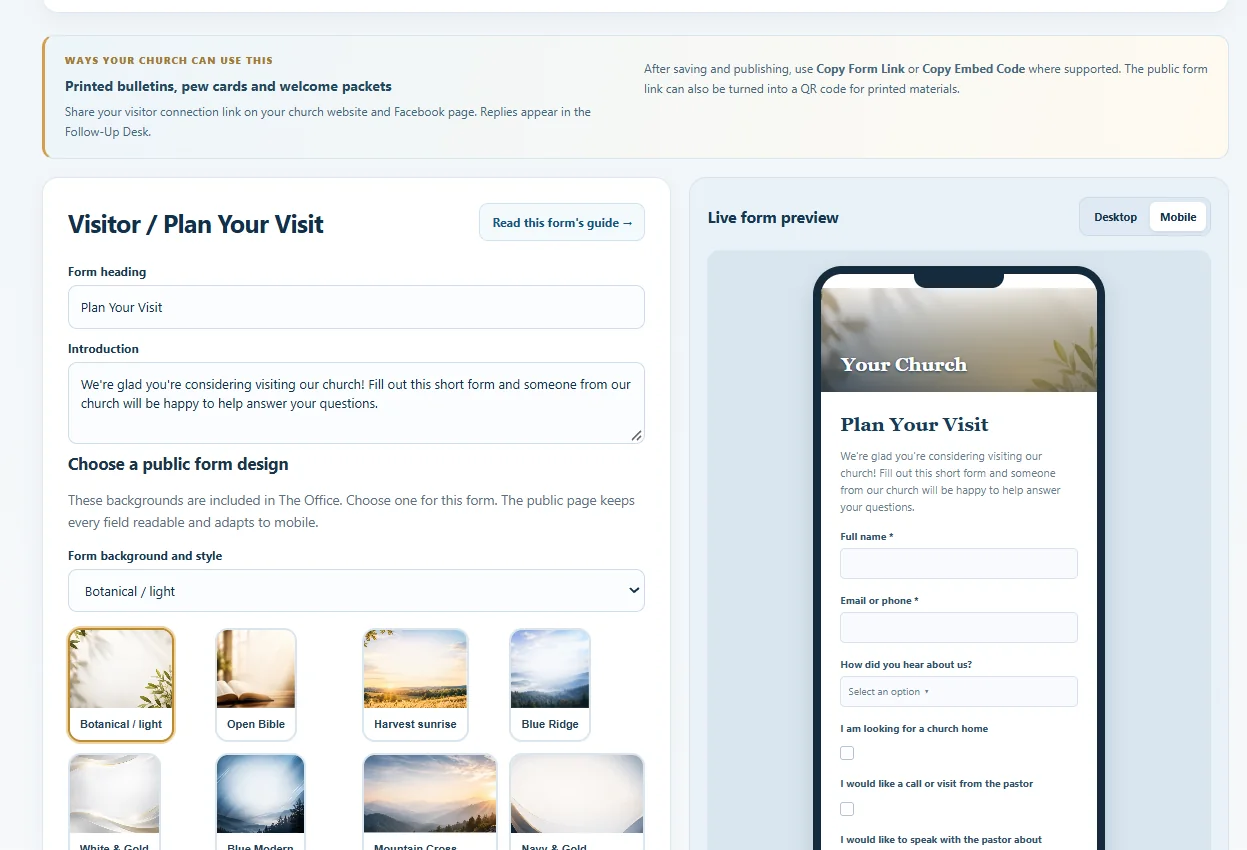 Actual Office interface · Demonstration data
Instead of searching across paper cards, messages, and separate websites, your church sees its new inquiries and unfinished follow-ups together.
Add a church form or Connection Card link to your bulletin, printed welcome card, livestream description, or church website.
The visitor submits the form on their phone. Their information goes to the church’s private workspace, not to a public page.
An authorized church worker reviews the response in Follow-Up Desk, records progress, and follows up personally.
No. Churches manage personal outreach and communications themselves.
No. Response management belongs in the private Follow-Up Desk for authorized church staff.
The Office provides software tools. Local churches remain responsible for personal ministry, data-entry decisions, and communications. Available features and usage limits depend on the selected plan.
Use The Office alongside your existing website or ministry processes. Higher Calling can also build a new church website with agreed Office integrations, quoted separately.
Compare software plansExplore Higher Calling website services