Choose the type of form
Start with visitor inquiries, an event interest form, or another available ministry form.
 The Officeby Higher Calling
Practical tools for local churches
Church forms should be easy to create, easy to share, and easy for someone to answer on their phone. The Office provides an editor with design choices and desktop/mobile previews.
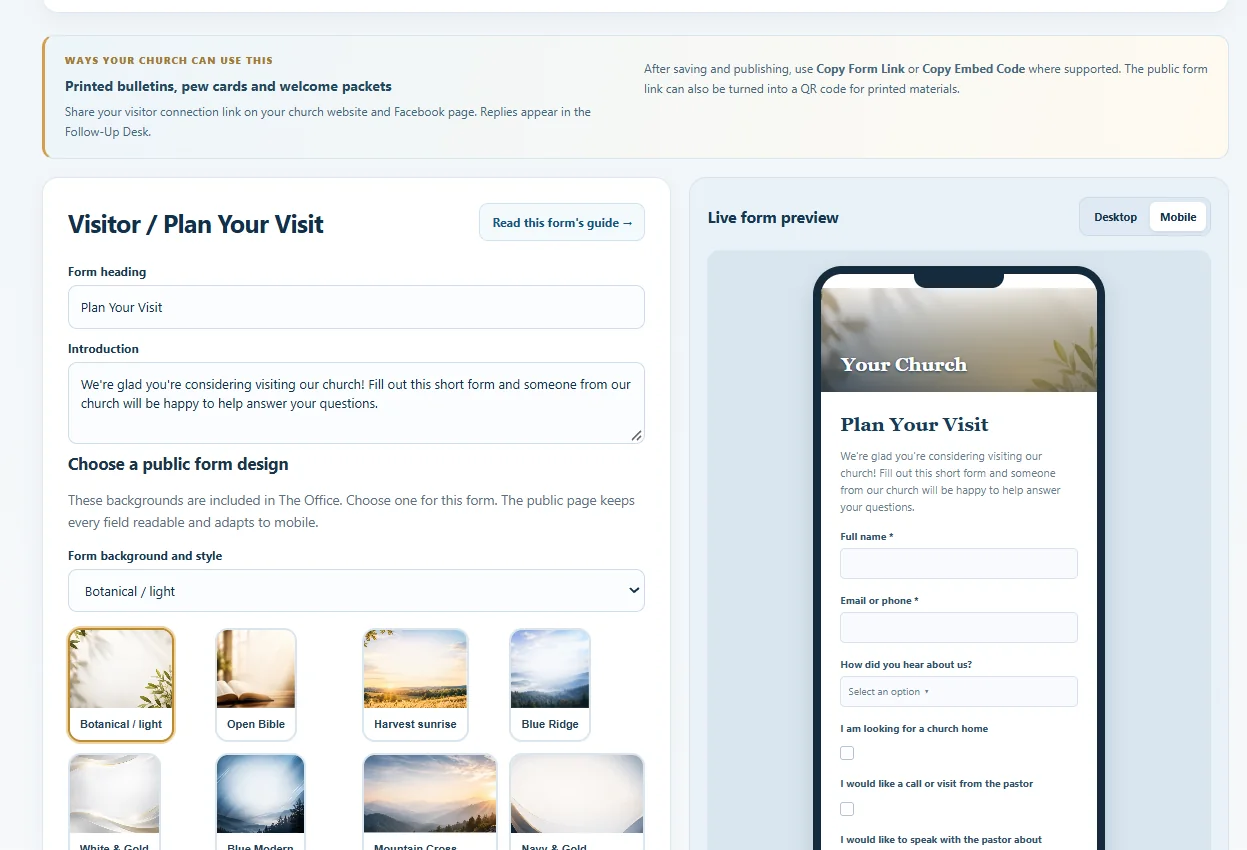 Actual Office interface · Demonstration data
Using one connected workspace avoids scattering visitor records across unrelated form services.
Start with visitor inquiries, an event interest form, or another available ministry form.
Adjust headings, questions, and allowed design options, then inspect desktop and mobile previews.
Use a public link or QR code, then review incoming submissions in Follow-Up Desk.
Yes. Public forms are designed to accept visitor responses without an Office login.
Inside the private Follow-Up Desk, not in the public form editor.
The Office provides software tools. Local churches remain responsible for personal ministry, data-entry decisions, and communications. Available features and usage limits depend on the selected plan.
Use The Office alongside your existing website or ministry processes. Higher Calling can also build a new church website with agreed Office integrations, quoted separately.
Compare software plansExplore Higher Calling website services